Key Highlights:
- Minecraft Dungeons II is now available on Xbox Series X/S, PlayStation 5, Nintendo Switch, Nintendo Switch 2, and Steam.
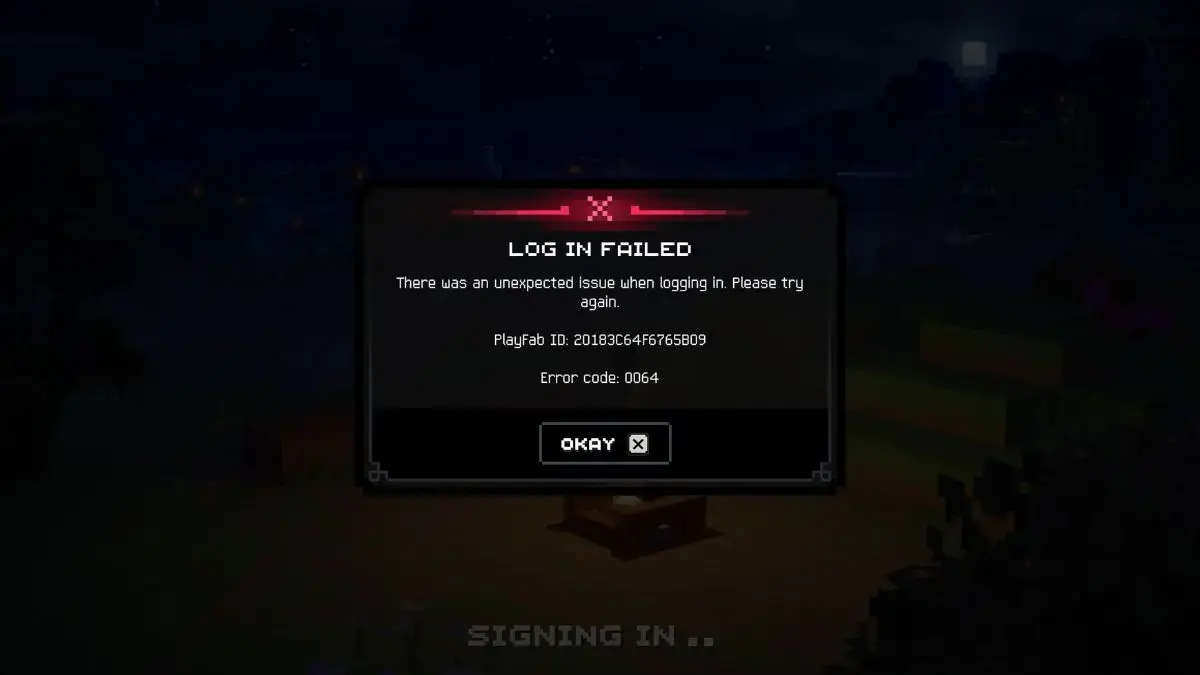
- Some players are reportedly encountering Error 0064 when trying to start the game or sign in.
- Possible workarounds include restarting the game, retrying the login process, repairing the Minecraft Launcher, or reinstalling the game.
Minecraft Dungeons II Players Report Error 0064 at Launch
Minecraft Dungeons II has launched for Xbox Series X/S, PlayStation 5, Nintendo Switch, Nintendo Switch 2, and PC through Steam. However, reports on Reddit and Google Search trends indicate that some players have experienced problems while attempting to play the latest Minecraft action-RPG adventure.
The reported issue involves Error 0064, which may appear when players try to boot the game or sign in. Some gamers have speculated that the error could be linked to launch-day server overload or an issue with Microsoft authentication. The exact cause has not been confirmed.
What Is Causing Minecraft Dungeons II Error 0064?
Based on the available reports, Error 0064 does not appear to be limited to a specific console. Players have described encountering the problem across multiple platforms, making a hardware-specific game bug less likely. The error has also reportedly affected users while they are attempting to sign in rather than after they have successfully entered the game.
Google Search trends for Error 0064 spiked only briefly on Sept. 29, suggesting that the problem may have been resolved or at least reduced. Players who are already inside Minecraft Dungeons II should not be affected by the reported sign-in issue, according to the available information.
How to Fix Error 0064
Some players have reported that restarting Minecraft Dungeons II or repeatedly selecting the login button eventually allowed them to access the game. Other potential solutions include signing out of and back into a Microsoft account.
PC players can also try repairing the Minecraft Launcher on a Windows computer:
- Open Windows Search and type Minecraft Launcher.
- Right-click Minecraft Launcher when it appears and select App Settings.
- Select Terminate to close the launcher, then choose the Repair option.
- After the repair is complete, reopen Minecraft Launcher and select Minecraft Dungeons II.
If these steps do not resolve the problem, players can try uninstalling and reinstalling the game. Minecraft Technical Support is another option for users who continue to encounter Error 0064.
Why This Matters
Launch-day authentication and server problems can prevent players from accessing a newly released online-connected game even when the game itself is installed correctly. The cross-platform reports surrounding Minecraft Dungeons II Error 0064 point toward a sign-in or service-related issue rather than a problem tied to one particular console. The brief Google Search spike indicates that the issue may not be affecting players at the same level over time, but affected users still have several troubleshooting options available.
Frequently Asked Questions
What is Error 0064 in Minecraft Dungeons II?
Error 0064 is a reported launch or sign-in error that some players have encountered when trying to access Minecraft Dungeons II. Its exact cause has not been confirmed.
Which platforms have reported Error 0064?
Reports indicate that the issue has occurred across multiple platforms, including the Xbox Series X/S, PlayStation 5, Nintendo Switch, Nintendo Switch 2, and PC versions of Minecraft Dungeons II.
How can players try to fix Error 0064?
Players can restart the game, retry the login process, sign out of and back into their Microsoft account, repair the Minecraft Launcher on Windows, or reinstall the game. If the problem continues, they can contact Minecraft Technical Support.
Leave a Reply